


Pokémon HOME
3.711.42K Reviews
App Specs
- Version
- 4.0.3
- Updated On
- License
- Free
- Downloads
- 10,000,000+
- Developer
- The Pokémon Company
- Categories
- Tools
- Platform
- Android, iOS
Screenshots
 Analysis by AppCompare
What I find most useful about Pokémon HOME is the role it plays between play sessions: it gives a collection a place to be viewed and managed without requiring me to open each compatible game in turn. That makes it less of a game in its own right and more of a collection-management tool. I’d consider it when I want to keep track of Pokémon gathered across supported games, but I wouldn’t install it expecting it to replace the games themselves or make every Pokémon available everywhere.
A cloud hub with a specific job
Pokémon HOME is a free tools app from The Pokémon Company, released on February 4, 2020. Its current version is 3.4.3, and it runs on Android 6.0 or later. It has an average rating of 3.8 from around 118,000 ratings, with more than 10 million installs. The age rating is Everyone. Those figures suggest a widely used service, though its usefulness depends more on which Pokémon games I play than on how large its audience is.
The key distinction is that a shared view of a collection is not the same as unrestricted movement between games. Compatibility and transfer rules matter, so I treat HOME as a place to organize and exchange eligible Pokémon, not as a universal shortcut that removes every game-specific limit. Before moving something I care about, I’d check the destination game’s compatibility and think through whether I actually want that Pokémon there.
That small pause is worthwhile for collectors. A Pokémon can be emotionally valuable because of where it came from or how I used it, and a transfer is more consequential than simply rearranging a box on a phone. My practical advice is to decide on a purpose before moving a favorite: fill a gap, prepare a team, or consolidate a collection. If there isn’t a clear reason, leaving it where it is can be the better choice.
Where it fits in a Pokémon routine
The app makes the most sense for players who move between compatible games, enjoy trading, or have built a collection over time. It is also useful when I want to look over what I own before choosing a team or deciding what to hunt for next. Someone focused on one game and a small active roster may get less from a separate collection hub, especially if they rarely trade or transfer Pokémon.
A realistic use is planning a short play session around a Pokédex gap. I can check what I have, use the GTS to state what I’m seeking and what I’m willing to offer, then return to the game with a clearer target. Wonder Box suits a different mood: I can deposit a Pokémon and accept that the result is uncertain, treating the exchange as a surprise rather than a precise way to obtain a particular species. Those tools are not interchangeable; one is a request-driven trade, the other is a gamble in exchange for convenience.
That difference also helps set expectations. A global trading feature can connect players who want different things, but a request still depends on another person having a suitable Pokémon and accepting the terms. I wouldn’t rely on it for a last-minute, guaranteed addition to a team. For that, direct options within the game I’m playing may be more practical. HOME is stronger when I can plan ahead and use its collection view to make a trade worthwhile.
Worth Reading Before You Choose

EA SPORTS FC Mobile 26 Is a Bigger Football Game, but It Takes Time

Flipboard Shows What News Apps Must Do Beyond the Feed

Switching to Android Auto Means Rethinking Your Driving Routine

Google Calendar Makes a Crowded Week Easier to Manage

Ludo King Makes the Most of the Minutes Between Plans

Baby Panda World Brings Quick Play to Modern Phones, but Its Game Library Feels Busy
Moving Pokémon without losing track
Before making a transfer, I like to use the boxes as a staging area: separate Pokémon I might move from those I’m keeping in place, and avoid treating the whole collection as one undifferentiated pile. That simple habit makes it easier to notice what I’m about to send and why. It is especially helpful when returning after a break, when I may not remember which Pokémon were intended for a particular game or team.
HOME’s cloud-based setup is valuable as a central service, but it does not make careful account management irrelevant. Linking the right Nintendo account is an important first step, and I’d take time to confirm I’m using the account tied to the games and collection I mean to manage. If a connection behaves unexpectedly, I’d check the account and the game connection before repeatedly trying the same transfer. That is a calmer troubleshooting approach than moving Pokémon first and sorting out the account later.
For people with a long history of collecting, the Pokémon Bank transfer option may be the most meaningful part of the workflow. It offers a route for bringing older collections into the service, which can matter more than day-to-day trading. I’d treat that as a deliberate migration rather than a casual tap: first decide which collection I want to bring forward, then make sure I understand where each Pokémon is going. The value is continuity, not simply having another box to browse.
What the free and paid choices mean
The app is free to download, while in-app purchases range from $2.99 to $15.99 per item. The free version has limits, including a cap on how many Pokémon can be deposited, so a large collection may push me toward a paid option. I would start free and see whether the available space and features fit my habits before spending. If I only check the collection occasionally, paying may not solve a problem I actually have.
For a committed collector, the trade-off is different: paying can be easier to justify if the storage limit repeatedly interrupts transfers or organization. Still, I’d avoid upgrading simply because I assume every feature requires it. First identify the exact friction—space, frequency of use, or a particular workflow—and decide whether the paid tier addresses it. The app’s purchase range is clear, but choosing whether it is worthwhile is personal, based on how much of my Pokémon time involves managing a collection rather than playing a single game.
Living with the collection over time
I find that a collection becomes easier to enjoy when I revisit it with a purpose instead of treating every Pokémon as something to move immediately. In this section, I’d look at how small, deliberate check-ins can keep older catches meaningful without turning organization into a chore. That perspective also leads naturally to the next question: what should I keep an eye on as the service continues to evolve?
Getting Started with Pokémon HOME
Diving into Pokémon HOME is super straightforward. After downloading the app, you'll be prompted to link it with your Nintendo account. This step is key because it's how you'll connect Pokémon HOME to your various games like Pokémon Sword, Shield, and even Pokémon GO. The process is quite seamless, and before you know it, you're ready to start managing your Pokémon collection like a pro.
User Interface and Experience
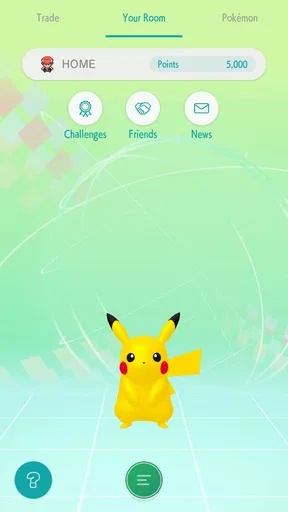
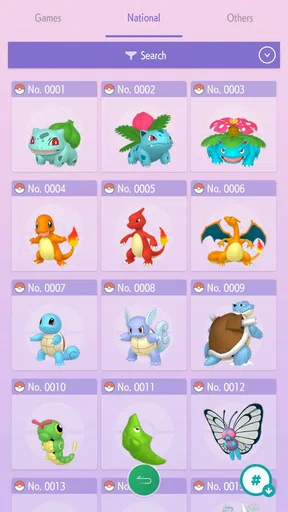
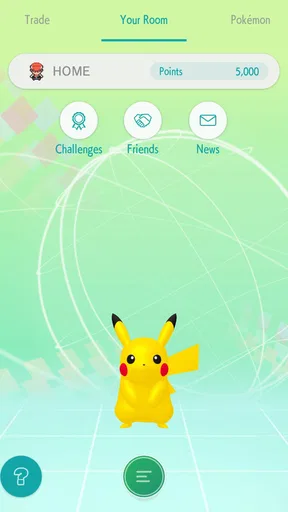
The user interface is pretty intuitive. Once you're in, the app greets you with a vibrant and colorful design that feels very Pokémon-esque. Navigation is a breeze with everything laid out clearly in tabs. You can switch between your Pokémon boxes, the Pokédex, and the trading features without any hassle. It feels like the developers really thought about making this app user-friendly, even for those who aren't tech-savvy.
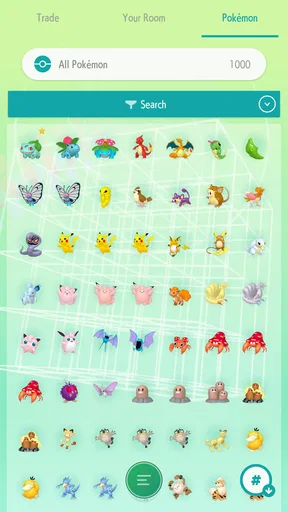
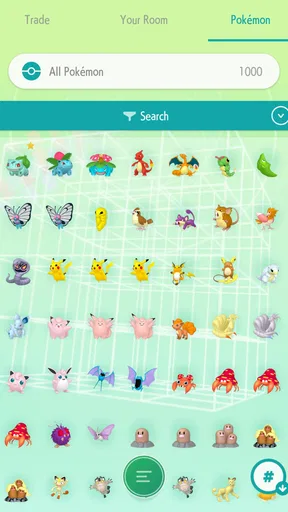
One of the first things that caught my eye was the ability to view my entire Pokémon collection from various games in one place. That's a dream come true for any Pokémon trainer! No more switching between games just to see what you have. It’s all right there at your fingertips.
Features Galore
Now, let’s talk about features because Pokémon HOME is packed with them. The app allows for easy transfer of Pokémon between different games. There’s a handy feature where you can transfer Pokémon from Pokémon Bank, which is a massive relief for anyone who has been collecting for years.
Another cool feature is the Wonder Box, which lets you trade Pokémon with others around the world. You simply put a Pokémon in the Wonder Box, and voila, you might get a rare or unexpected Pokémon in return. It’s like a surprise gift every time.
Then, there's the GTS (Global Trade System), where you can specify which Pokémon you want to trade and what you’re looking for in return. It's a fantastic way to complete your Pokédex or get that elusive Pokémon you've been hunting for.
Challenges and Considerations
While Pokémon HOME is generally a joy to use, it's not without its quirks. Some users have noted that the free version of the app is a bit limited. For instance, you can only deposit a certain number of Pokémon unless you upgrade to the premium plan. Speaking of premium, the annual subscription fee is something to consider if you're planning to use the app extensively.
Another point worth mentioning is the initial setup. While linking accounts is generally smooth, I did encounter a few hiccups connecting to Pokémon GO. A bit of patience was required, but it all worked out in the end.
Final Thoughts
All in all, Pokémon HOME is a must-have for any serious Pokémon trainer. It’s packed with features that make managing your Pokémon collection easier and more fun than ever before. Whether you're trading with friends across the globe or just keeping your Pokédex up to date, this app has got you covered.
If you’re ready to take your Pokémon game to the next level, you might want to give Pokémon HOME a try. It's more than just an app; it's a gateway to a more organized and exciting Pokémon journey. So go ahead, download it, and let the adventure continue!
How it compares with keeping everything in-game
The most relevant alternative is often not another app but the storage and trading tools inside the Pokémon game I already play. In-game boxes are convenient when I’m building a team for that specific title, while HOME is more useful when I want a broader view across supported games or need to trade beyond the immediate game session. I see the two as complementary: the game is where I make moment-to-moment decisions, and HOME is where I handle collection-level tasks.
That distinction matters if I mainly care about battling. HOME can help me locate and move eligible Pokémon, but it doesn’t replace the experience of choosing moves, testing a team, or playing through the game. A player who wants a battle companion or a full game on their phone should skip it for that purpose. Its value is organizational and connective, not a substitute for the main Pokémon games.
It also differs from keeping informal notes or screenshots. A list can remind me what I own, but it cannot provide the same direct collection and trading workflow. Conversely, if I only need to remember a handful of favorites, a separate hub may feel like extra maintenance. I’d install it when the collection itself has become something I actively manage, not just because I want another place to check a Pokédex.
Small habits that prevent avoidable frustration
One useful habit is to decide whether a Pokémon is a keeper, a trade candidate, or a transfer candidate before placing it into a workflow. That sounds obvious, but it prevents the Wonder Box’s randomness from becoming a source of regret. I’d reserve surprise trades for Pokémon I’m genuinely comfortable exchanging, and use the GTS when I have a specific goal and can make a considered offer.
I’d also use the Pokédex and collection view as planning tools rather than assuming they answer every compatibility question. Seeing a Pokémon in the service does not, by itself, mean it can move into every game I own. Checking the destination before initiating a transfer helps avoid the disappointment of organizing a team around a move that is not available in that title.
For returning players, a gradual approach is easier than trying to sort everything in one sitting. I’d first inspect the collection, identify a few immediate priorities, and handle only those transfers or trades. Then I’d learn the rhythm of the boxes and revisit the rest later. This keeps a large backlog from turning the app into a chore, and it makes the storage limit easier to judge before considering a purchase.
Who will get the most from it
I’d recommend HOME to collectors who switch among compatible games, players who enjoy trading, and anyone trying to make sense of Pokémon gathered over a long period. It is particularly appealing if a collection has personal history: being able to review it in one place gives me a reason to preserve and organize Pokémon rather than letting them disappear into separate game boxes.
I’d be more cautious if I play only one game, rarely trade, and have no interest in moving Pokémon between titles. In that case, the in-game storage may already be enough, and the app’s limits or account setup could feel like unnecessary steps. It is also not ideal for someone who expects a guaranteed result from every trade. The Wonder Box is deliberately uncertain, and the GTS depends on finding a compatible offer from another player.
The best test is simple: do I have a collection-management task I want to do more than once? If the answer is yes—checking what I own, planning transfers, or working toward a trade—HOME has a clear purpose. If I only want to play a Pokémon game, I can skip the extra layer without missing the core adventure.
Evolution, continuity, and what I would watch
The app’s release date and current version give a useful frame for judging its life so far: it launched in 2020 and is now at version 3.4.3. That tells me it has continued through multiple version changes, but a version number alone does not tell me which specific features changed or how each update affected a particular transfer. I would not treat it as a promise that every older workflow or game connection will remain unchanged forever.
For an existing user, the practical question is less “What number is the version?” and more “Does the current version still support the games and transfers I rely on?” Before making a major move, I’d check the in-app options and make a small, low-stakes transfer if I’m unsure how a workflow behaves. That is especially sensible after returning from a long break or changing the games I play.
What I would watch going forward is whether the service continues to fit the games I actually use, whether its storage limits remain comfortable for my collection, and whether trading still helps me reach realistic goals. Those are expectations, not confirmed promises about future changes. For now, the app’s strongest case is straightforward: it gives dedicated Pokémon players a practical place to manage a collection across supported games, provided they are willing to plan around compatibility, storage, and the occasional uncertainty of trading.
Pros
- Easy cross-platform Pokémon transfer
- User-friendly interface for all ages
- Wide compatibility with Pokémon games
- Cloud storage to keep Pokémon safe
- Regular updates and new features
Cons
- Limited free storage space
- Requires stable internet connection
- Subscription needed for full features
- Occasional sync issues
- Not all Pokémon are transferable
FAQs for Pokémon HOME
What is Pokémon HOME and how does it work?
Pokémon HOME is a cloud-based service designed to be a central hub for all your Pokémon collections. It allows you to transfer Pokémon from various games like Pokémon Sword, Shield, Let’s Go Pikachu, and Let’s Go Eevee. You can also trade Pokémon with other users globally via the app's built-in trading features.
Is Pokémon HOME free to use, or is there a subscription fee?
Pokémon HOME offers both free and premium plans. The free version provides basic features, while the premium plan unlocks additional storage and trading capabilities. The premium subscription is available in monthly, quarterly, and annual options, allowing you to choose what best fits your needs.
How does trading work in Pokémon HOME?
Trading in Pokémon HOME is facilitated through several methods, such as Wonder Box, GTS, Room Trade, and Friend Trade. Each offers unique ways to trade Pokémon, whether you're seeking specific ones or enjoying random trades. The premium plan enhances these features, providing more trading slots and options.
Can I transfer Pokémon from Pokémon GO to Pokémon HOME?
Yes, Pokémon can be transferred from Pokémon GO to Pokémon HOME, but there are certain restrictions and limitations. Transfers require the use of the GO Transporter, which consumes energy that recharges over time. Ensure that your Pokémon GO account is linked to Pokémon HOME to enable this feature.
What devices are compatible with Pokémon HOME?
Pokémon HOME is compatible with both Android and iOS devices via its mobile app, and it also has a Nintendo Switch version. The mobile app provides access to trading and management features, while the Switch version focuses on transferring Pokémon between games. Ensure your device meets the app's system requirements for optimal performance.


